Problem
When starting Remote Control (RC) in the browser (Five9 Console or Ivanti Web Console), the connection does not work.
Solution
In order to run RC from a web browser (Five9 Console and Ivanti Web Console), the LANDESK server certificate ("LANDesk_...") must be published to the "Trusted Root Certification Authorities" store on the device from which you want to start RC via the web.
Step by Step Guide
1.) Find the Certificate on the Core Server
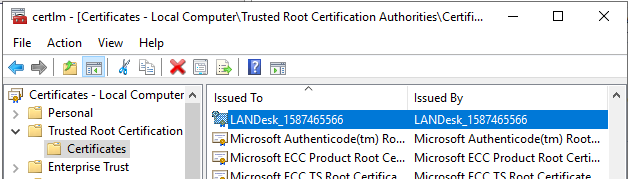
2.) Export the Certificate
Or find the existing file in e.g. "C:\Program Files\LANDesk\Shared Files\keys" as mentioned in the Ivanti Docs:
https://hub.ivanti.com/s/article/Pre-Trusting-the-LANDesk-Certificates?language=en_US
3.) Import it into the 'Trusted Root Certification Authorities' store on all computers that are used to start Remote Control via a browser.
This can be done by
- internal CA
- AD logon Script
- Group Policy
- Custom Patch
- Software Distribution
- ...
FAQ
Q: Why is RCViewer.exe working without distributing the certificate?
A: RCViewer.exe ignores the certificate check.
Q: Why does the browser-based Remote Control work from the Core Server but not from other devices?
A: The core server itself knows its own Certificate and trusts it.
Was this article helpful?
That’s Great!
Thank you for your feedback
Sorry! We couldn't be helpful
Thank you for your feedback
Feedback sent
We appreciate your effort and will try to fix the article