Since Ivanti EPM 2022 SU5, Ivanti only supports HTTPS connections to the EPM API.
Therefore, it is recommended to use the five9s Console over HTTPS rather than HTTP.
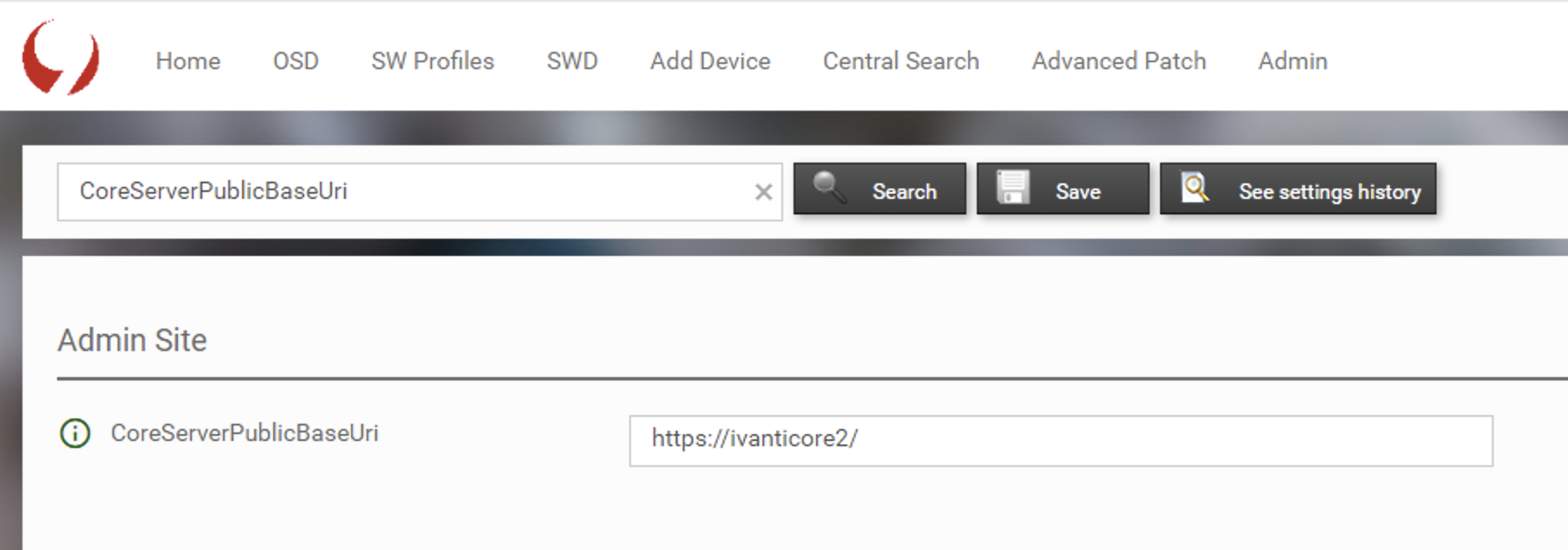
To ensure that the five9s Console communicates with the EPM API via HTTPS, verify that the Console setting CoreServerPublicBaseUri is configured to use HTTPS. If changes are made, recycle the five9s Application Pool.
To verify and, if required, update the configuration, follow these steps as an administrator:
Step 1: Open the Expert Admin page by browsing https://CoreServerName/five9sConsole/ExpertAdmin.aspx
Step 2: Search for "CoreServerPublicBaseUri" and verify that the URI is configured to use HTTPS. If it is not configured for HTTPS, update the URI.
If you changed the URI:
Step 3: Click on "Save" right next to the search button
Step 4: On the Core Server, open IIS Manager
Step 5: Navigate to the Application Pool five(9)s
Step 6: Right click on Application Pool and select Recycle

Was this article helpful?
That’s Great!
Thank you for your feedback
Sorry! We couldn't be helpful
Thank you for your feedback
Feedback sent
We appreciate your effort and will try to fix the article